
Invoices
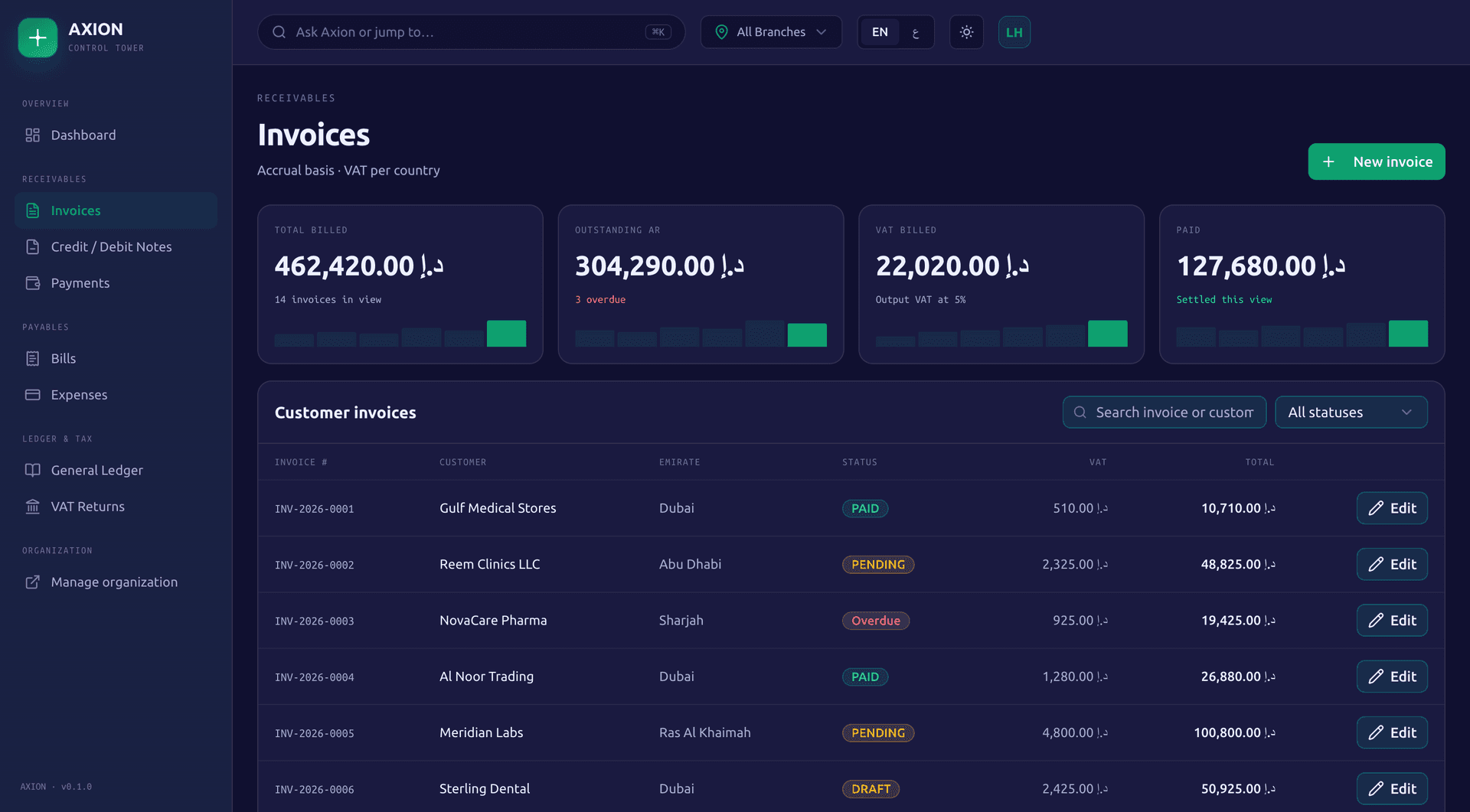
Raise tax invoices with a PDF, scoped to the branch and legal entity that issued them.
Raise invoices, take payments and close your books per legal entity, with VAT worked out on every line at each country's rate. Saudi invoices sign and clear with ZATCA, and UAE invoices are built to the 51 mandatory fields ready for your own accredited service provider.
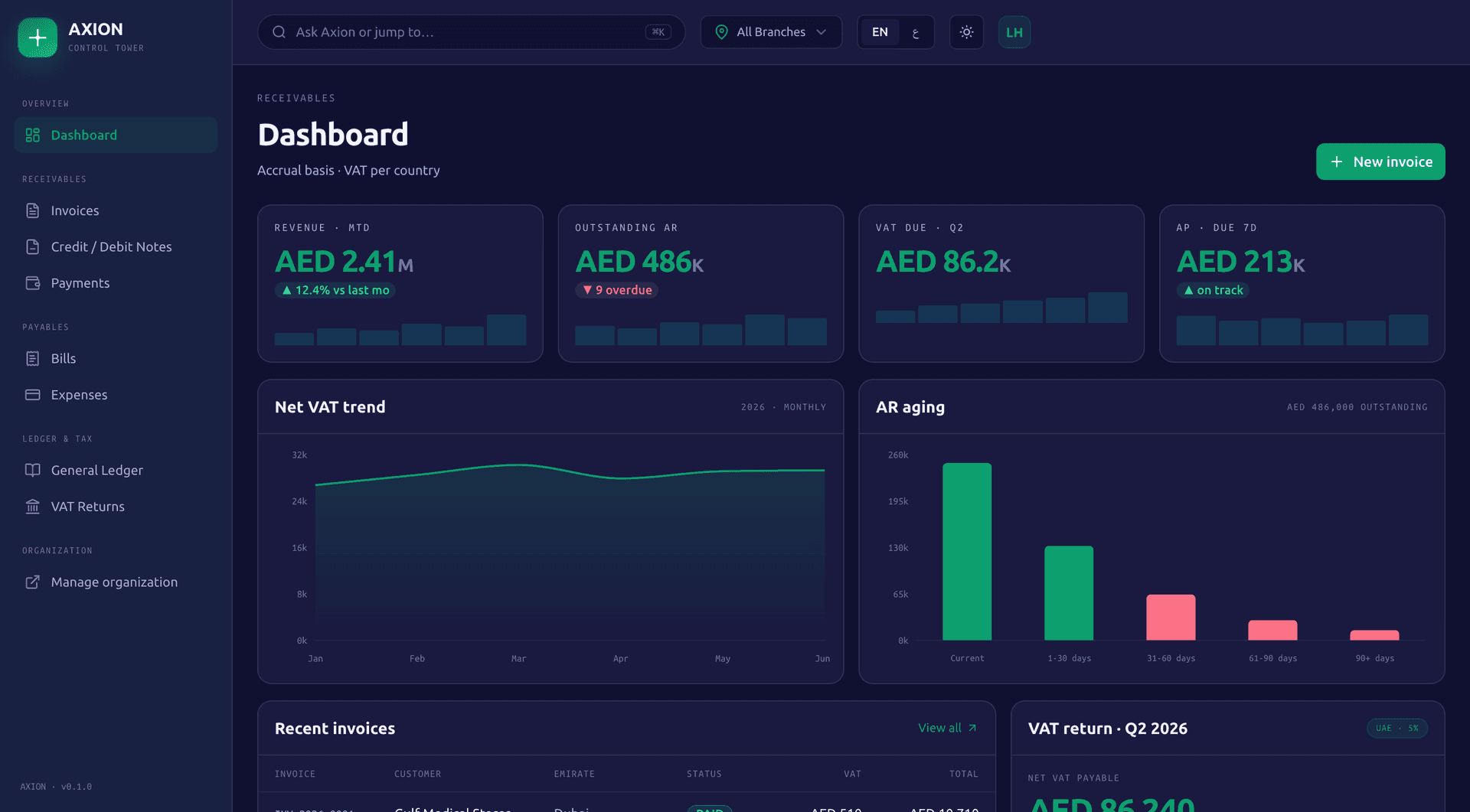
Invoice, get paid and chase what is overdue, per legal entity.
Raise tax invoices with a PDF, scoped to the branch and legal entity that issued them.
One record per customer, shared across invoices, payments and credit notes.
Issue automatically on a daily, weekly, monthly, quarterly or yearly schedule. If a run fails, the schedule records the error and tries the same period again on the following days instead of moving past it.
Approve or reject an invoice before it goes out.
First, second and final reminders, with a history of what was sent.
Record a payment against an invoice to mark it partly paid or paid, post the receipt to the ledger and refund it if needed.
Credit notes for returns and corrections. Debit notes go through an approval step before they are issued.
Outstanding receivables in five buckets: current, 1 to 30, 31 to 60, 61 to 90 and over 90 days.
Bills, vendors and the money going out.
Record supplier bills and their own payments against them.
One record per supplier, shared across bills and payment vouchers.
Vouchers with an approval step and a PDF.
Log expenses by category, with the receipt attached.
One ledger per legal entity, with the statements that come from it.
Manual journals alongside the entries invoices and payments post automatically, with a trial balance.
Balance sheet, income statement, profit and loss, and cash flow split into operating, investing and financing, each prepared per legal entity.
Set a budget and compare it against actual spend as it comes in.
Close and lock a period, then reopen it if you need to, with every reopening recorded. Run the year end close when the year is done.
Enter exchange rates by hand or fetch the latest with one action, then convert between currencies.
Bring in your statements and match them to what you already recorded.
Hold one or more bank accounts per legal entity.
Import a bank statement as CSV or QIF, or OFX with basic support, and have the lines matched to existing payments automatically.
Reconcile the account against the imported statement, with a reconciliation report.
Calculated on every line, at the rate the branch's country sets.
Every invoice line carries VAT at its own GCC country's rate.
Return figures prepared from your own transactions, laid out in the box format of the UAE, Saudi, Bahraini and Omani returns. Kuwait and Qatar have no VAT. Marking a return filed locks those months in the ledger. Axion prepares the figures; you file with the tax authority.
Onboarding through to clearance and reporting, for phase 2.
Onboard each electronic generation solution unit with its own key and CSR, the OTP from the Fatoora portal, a compliance CSID and then a production CSID. Run several units per company, each bound to one legal entity branch.
Every invoice is signed and chained to the one before it, with a running invoice counter per unit, so the chain shows if anything is missing.
Standard B2B invoices go for clearance and simplified B2C invoices for reporting. Credit and debit notes go through the same chain.
A submission that fails retries automatically without breaking the chain.
Axion prepares the document. Your accredited service provider sends it.
Axion captures and fills all 51 mandatory fields of the UAE e-invoicing data dictionary for tax invoices and credit notes.
Produces the PINT AE document as UBL 2.1 and checks it against the official PINT AE 1.0.4 rules, the same check that runs in Axion's own test suite on every change.
A document that fails a mandatory field check is blocked from being sent.
Connect your own accredited service provider, which transmits the document to the FTA. Axion is not an ASP.
Export invoices, payments, credit notes, ledger entries and trial balance to PDF or Excel.
Cancel a batch of invoices in one action.
Set up once per electronic generation solution unit, then every invoice follows the same chain.
Generate the key and CSR
Each EGS unit generates its own secp256k1 key and certificate signing request.
Get the compliance CSID
Submit the OTP from the Fatoora portal and receive the compliance certificate.
Get the production CSID
Move the unit to production and receive its production certificate. Bind the unit to one legal entity branch.
Sign and chain
Each invoice is signed with XAdES and chained to the previous invoice's hash, with the unit's invoice counter moving forward by one.
Clear or report
Standard B2B invoices are sent for clearance and simplified B2C invoices for reporting. Credit and debit notes follow the same chain.
Retry on failure
A submission that fails is retried automatically, and the chain is never broken by a retry.
The mandate is phasing in from 2027. Axion's part is the document; the sending is yours to arrange.
Figures prepared from your own transactions. You file the return with the tax authority.
| Country | Return figures | Filing |
|---|---|---|
| UAE | Prepared in the UAE return's box layout | You file with the FTA |
| Saudi Arabia | Prepared in the Saudi return's box layout | You file with ZATCA |
| Bahrain | Prepared in the Bahraini return's box layout | You file with the NBR |
| Oman | Prepared in the Omani return's box layout | You file with the OTA |
| Kuwait | No VAT | Not applicable |
| Qatar | No VAT | Not applicable |
CommerceFinance
Commerce orders and Sales orders become Finance invoices automatically, with a retry if Finance is briefly unavailable rather than a lost or duplicate invoice.
CommerceFinance
Commerce subscriptions bill each period as a Finance invoice the same way.
CommerceFinance
Approving a paid return creates the Finance credit note.
PeopleFinance
People payroll postings flow into the Finance general ledger once payroll is calculated.
DashboardFinance
The Dashboard rolls up Finance figures across every branch, or one.
FinanceDashboard
Ask Axion answers plain questions about your Finance summary alongside Sales, People and Supply Chain.
No. Axion captures and fills all 51 mandatory fields of the UAE e-invoicing data dictionary and produces the PINT AE document, checked against the official PINT AE 1.0.4 rules. You connect your own accredited service provider, and that provider transmits the document to the FTA.
No. Axion prepares the return figures from your own transactions, in the box layout of the UAE, Saudi, Bahraini and Omani returns, and marking a return filed locks those months in your books. You file the return with the tax authority yourself.
An OTP from the Fatoora portal for each electronic generation solution unit. Axion uses it to obtain the unit's compliance CSID and then its production CSID, and from then on every invoice from that unit is signed, chained and sent to ZATCA, for clearance if it is a standard B2B invoice or for reporting if it is a simplified B2C one.
Kuwait and Qatar have no VAT, so there is no return to prepare in either country. Axion prepares VAT return figures for the UAE, Saudi Arabia, Bahrain and Oman.
Yes. Finance is fully usable by itself. Turn on Commerce, Sales or People as well and their orders, subscriptions, returns and payroll postings flow into Finance automatically, without re-keying.
Not as a live feed. You import a bank statement as CSV, QIF, or OFX with basic support, and imported lines are matched to your existing payments automatically before you reconcile the account.
Apply for a 90-day pilot, or book a 30-minute demo and we will walk you through the boxes that fit your business, with your own numbers.
A Novamind product, built for the GCC.