
Employee profiles
One record per employee from onboarding to the final settlement, with a list export to PDF or Excel.
Run payroll for the UAE, Saudi Arabia, Kuwait, Qatar, Bahrain and Oman, with gratuity, social insurance and the UAE wage file worked out from your data. Leave, attendance, performance reviews and the full employee record sit in the same box, from onboarding to final settlement.
One record per employee from onboarding to the final settlement, with a list export to PDF or Excel.
See which visas, Emirates IDs, passports and other documents expire within the next 7, 14, 30, 60 or 90 days, with a separate list of what has already expired.
Every department carries a manager, who also appears on the org chart.
Built from department managers and each employee's own reporting line, merged into one chart.
Any employee can browse a company-wide directory by branch or department, not only admins.
Employees update their own phone number, address and emergency contact details; pay and identity fields stay locked.
Employees request leave and see their balance for the year; leave types come with one-click presets you can seed for the whole company.
A holiday list filterable by year, matched to each employee's own country, so everyone sees the holidays that apply to them.
Set a location and a radius from 50 to 5,000 metres per branch; a check-in outside that radius is refused and shows the exact distance.
Employees see their own attendance history over a date range; admins see company-wide stats and can delete a record to correct it.
Define shifts, assign them to a roster, and auto-assign default shifts to get a new team started quickly.
Calculated by country: in the UAE, 1.25x on normal days and 1.5x on nights, rest days and public holidays; in Saudi Arabia, a flat 1.5x. Requests go through approval.
Run payroll with a full audit trail of who changed what and when; a correction run sits alongside an already posted run rather than rewriting it.
Tax, deduction, allowance, end of service and social security rules, scoped by country, branch, employment type and salary band.
Salary records show a live GOSI contribution estimate while you edit pay for a Saudi employee.
Ad hoc, per-employee deductions, kept separate from the statutory rules engine.
Timesheets go through their own submit and approval workflow, separate from attendance punches.
File a reimbursement claim and a photo of the receipt fills in the amount, date, vendor and category; you can still enter it by hand.
A UAE Wage Protection System salary information file is generated from an approved payroll run, with IBAN checks and that run's payment deadline shown alongside it.
Calculated to each country's rules for all six GCC states.
A draft settlement totals the gratuity estimate, unused leave encashment, any notice pay and manual adjustments, then moves through approve and post.
Saudi GOSI, Kuwait PIFSS, Qatar GRSIA, Bahrain SIO and Oman SPF, each calculated to that scheme's rules.
Emiratisation, Nitaqat, Kuwaitisation, Qatarisation, Bahrainisation and Omanisation quotas, with sector rates you can edit.
Annual, quarterly, monthly or project reviews, rated 0 to 10, with bilingual goals moving from draft to approved.
Enrol staff in health, life, retirement, transport, housing, education or another benefit type, scoped per branch.
Employees view and download their own payslip as a PDF, with gross salary, deductions, tax, social security and net salary as separate columns.
Four reports, each as a PDF or Excel file: employees, salaries, leave requests and attendance.
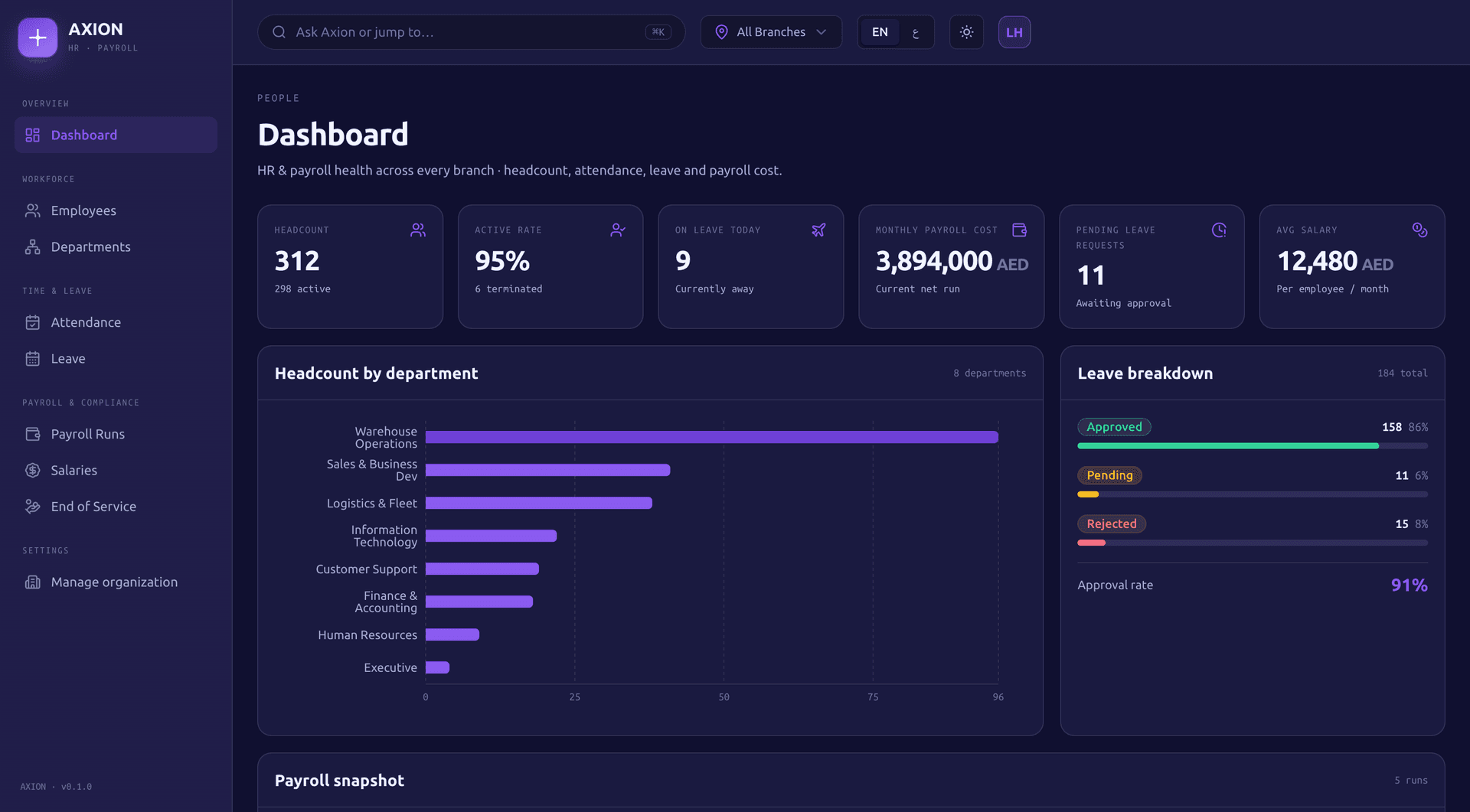
The People home screen shows headcount, attendance, leave and payroll figures at a glance.
What People calculates in each GCC country.
| Country | Gratuity | Social insurance | Nationalisation |
|---|---|---|---|
| UAE | Calculated | Not calculated | Emiratisation |
| Saudi Arabia | Calculated | GOSI | Nitaqat |
| Kuwait | Calculated | PIFSS | Kuwaitisation |
| Qatar | Calculated | GRSIA | Qatarisation |
| Bahrain | Calculated | SIO | Bahrainisation |
| Oman | Calculated | SPF | Omanisation |
Figures are calculated to each country's current rules; you file and pay through the relevant authority.
Calculate
Run payroll for the period; every payslip is set from your payroll rules, salaries and any deductions.
Review the audit trail
Each change is logged with who made it, when, and the before and after state, so the run stays auditable.
Approve
Move the run to approved once it has been checked, ready for salaries to be paid.
Generate the wage file
From the approved run, generate the UAE Wage Protection System salary information file, with IBAN checks and that run's payment deadline.
Post
Post the run once salaries have been paid.
Correct if needed
Open a correction run linked to the posted run rather than rewriting it, so the original run stays intact.
Payroll postings reach the Finance general ledger as soon as a run is calculated, not only once it is approved.
PeopleFinance
Payroll postings flow into the Finance general ledger as soon as payroll is calculated for the period.
PeopleDashboard
The Dashboard rolls up headcount and other People figures alongside every other box, for one branch or the whole group.
PeoplePlatform
Ask Axion answers plain questions about headcount from People, alongside Sales, Finance and Supply Chain, in one place.
No. Axion generates the wage file and calculates the GOSI estimate from your data. Submitting the file and paying contributions still goes through the Wage Protection System and GOSI themselves.
All six: the UAE, Saudi Arabia, Kuwait, Qatar, Bahrain and Oman, each calculated to that country's rules.
Yes. Payroll rules are scoped by country, branch, employment type and salary band, so one run can apply the right rule to each employee.
Each branch can set a location and a radius from 50 to 5,000 metres. A check-in outside that radius is refused and shows the exact distance the employee is from the branch.
No. It reads a photo of the receipt and fills in the amount, date, vendor and category for you to check. You still approve the claim, and you can enter it by hand instead.
No. Payslip downloads are scoped to your own record. The self-service profile lets you edit your own contact and emergency details, not pay or identity fields.
Apply for a 90-day pilot, or book a 30-minute demo and we will walk you through the boxes that fit your business, with your own numbers.
A Novamind product, built for the GCC.