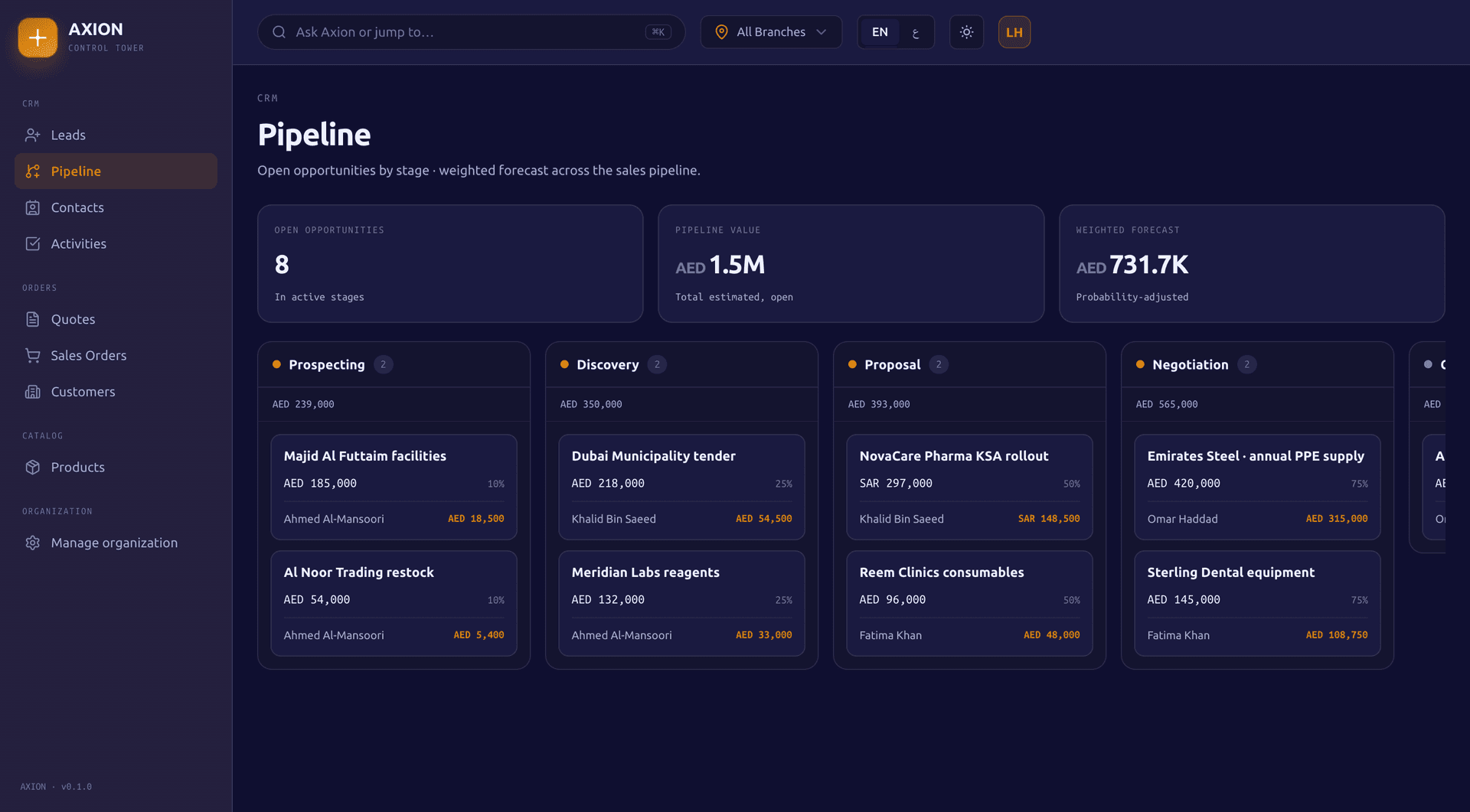
Run your pipeline from first lead to fulfilled order
Axion Sales tracks leads, opportunities, quotes and orders through pipelines and stages you define yourself, in English and Arabic. Automations, lead scoring and a weighted forecast run on the same records, and an accepted quote converts straight into a sales order.
A weighted forecast across commit, best case and pipeline
A lead's source (website, referral, social media and more) and status (new, contacted, qualified, proposal sent, negotiation, won, lost or nurturing) are tracked from first contact. Convert a lead into a contact and an opportunity in one action, and rescore it as things change.
Web forms and website leads
Embed a web form on your own site and every genuine submission becomes a lead, or post leads from your website's backend with an API key scoped to leads. Each form has its own unguessable key you can rotate, and submissions are rate limited.
Lead scoring
Rules you define add up points into a total, which buckets the lead into a grade from A to D, and a lead auto-qualifies once it reaches 80.
Duplicate detection
Match rules find duplicate leads, contacts and accounts by exact or fuzzy matching. Merging one record into the survivor carries over its child records and account links before the loser is deactivated.
Assignment rules and territories
Assignment rules and sales territories route new leads and opportunities to the right rep automatically, independent of the automation engine below.
Sales
Pipeline and forecasting
Custom pipelines and stages
Build your own pipeline with your own stages. Each stage carries a name, a sort order and a win probability from 0 to 100.
Weighted forecast
Every open opportunity is weighted by its stage probability, then rolled up into three forecast categories, commit, best case and pipeline, each measured against the matching rep's quota.
Sales performance
Targets are set by user and period, commission plans carry their own rules, and commission statements are approved and then marked paid.
Reports
Six analytics reports (sales funnel, win and loss, forecast, lead conversion, activity performance and pipeline ageing) plus breakdowns by lead source, stage and activity type.
Exports
Contacts, leads, opportunities and activities export to PDF or Excel.
Sales
Accounts and contacts
Accounts
Parent and child account hierarchies roll up automatically, and a contact can be linked to an account with a role.
Contacts
Full contact records with bulk edit across many contacts at once.
Customers
Customer records shared with quotes and orders, with create, edit and full detail views.
Calendar
One calendar merges your activities and dedicated meetings, with meetings created, rescheduled and cancelled.
Activities and tasks
Log a call or email as an activity, and create, edit, complete or delete a task, in one unified view.
Sales
Quotes and orders
Quotes
Create a quote, send it, and track it through accepted, rejected or expired. Revise it into a new version whenever the deal changes.
Quote to order
An accepted quote converts straight into a sales order in one step, with nothing re-entered.
Sales orders
Move an order through confirm, credit hold release, fulfil in part or in full, close or cancel.
Sales
Campaigns and automation
Campaigns
Build a campaign from a criteria-based segment, add members individually or pull them in bulk from the segment, and see ROI as net revenue against budget.
Email templates
Reusable templates, shared by manual sends and email campaigns alike.
Email campaigns
Send a campaign to your list and see who opened and clicked, with open and click rates against delivered emails. Every recipient is checked against an unsubscribe and bounce suppression list before the send goes out.
Sales automation
Automations run on their own once a trigger fires, with conditions that match field values before any action runs.
Sales
The detail behind it
Sales automation: triggers and actions
Each automation matches one of these triggers, tests its conditions against the event's field values, then runs any combination of these actions, in order.
Triggers
Lead created, lead status changed, opportunity created, opportunity status changed, activity completed, contact created.
Actions
Assign, update status, send email, create task.
A failure in one automation is caught and logged without blocking the others.
Forecasting and commissions
Weighted value
Estimated value multiplied by the stage probability, divided by 100.
Forecast categories
Commit, best case and pipeline roll up separately, each against the matching rep's quota.
Snapshots
A forecast can be recomputed and saved as a point-in-time snapshot.
Commission plans
Each commission plan carries its own set of rules.
Commission statements
Statements are approved, then marked paid, or cancelled.
Lead scoring grades
Rules you define award points for matching criteria, and the total decides the grade.
Grade A
80 points or more. A lead at 80 or above auto-qualifies.
Grade B
50 to 79 points.
Grade C
20 to 49 points.
Grade D
Under 20 points.
Included with a Sales subscription
Commerce box
A Sales subscription includes the Commerce box, so an accepted quote becomes a sales order that runs through Commerce's own order lifecycle: confirmed, released from a credit hold, fulfilled in part or in full, closed or cancelled.
A sales order becomes a Finance invoice automatically, through a handoff that retries if Finance is briefly unavailable: the invoice is delayed, never lost, and never created twice.
Yes. Build a campaign from a criteria-based segment, add members individually or in bulk, and send with a reusable template. Every recipient is checked against an unsubscribe and bounce suppression list before the message goes out, opens and clicks are tracked per campaign, and campaign ROI is worked out from attributed revenue against budget.
Can I capture leads from my own website?
Yes, two ways. Embed an Axion web form on your site, and each submission becomes a lead; every form has its own key you can rotate if it leaks, and submissions are rate limited. Or have your website's backend create leads with an API key scoped to leads. Either way the enquiry lands in your pipeline with its source, ready to score, assign and follow up.
Do I have to use default pipeline stages?
No default stages ship. Every pipeline and its stages are yours to define, and each stage carries its own win probability from 0 to 100, which feeds the weighted forecast.
What happens when a quote is accepted?
An accepted quote converts straight into a sales order in one step, with nothing re-entered. From there the order can be confirmed, released from a credit hold, fulfilled in part or in full, and closed.
Does Sales handle commission for my reps?
Yes. Commission plans and their rules are set up per plan, and commission statements are approved and then marked paid, alongside sales targets set by user and period.
Get started
Turn on Sales today.
Apply for a 90-day pilot, or book a 30-minute demo and we will walk you through the boxes that fit your business, with your own numbers.